Which Bobbin Case Fits the Brother XR9550?
The Brother XR9550 uses a Class 15, also called A or SA156, bobbin system, so choose a bobbin case and bobbin made for that system. Check the machine manual and the case shape before ordering.
On this page (8 sections)
- What bobbin case fits the Brother XR9550?
- Is the Brother XR9550 bobbin case the same as the bobbin?
- Which bobbin supplies work with the Brother XR9550?
- How do you choose between Size A and SA156 bobbins?
- How do you replace a Brother XR9550 bobbin case?
- What causes Brother XR9550 bobbin case problems?
- How should you care for the bobbin case?
- Which Brother XR9550 bobbin case should you choose?
The Brother XR9550 uses a Class 15 bobbin system, also called Size A or SA156. For a replacement bobbin case, match the case to the XR9550 model and confirm the exact Brother part number in your manual before ordering.
The bobbin case holds the lower thread supply and works with the hook area below the needle plate. It keeps the bobbin aligned while the upper thread passes around it to form each stitch.
A case that looks similar can still be the wrong shape, so size alone is not enough for a safe match. Small differences in the rim, latch or thread guide can stop the bobbin from turning freely.
This matters most when a case has been dropped, struck by a needle or worn over time. A replacement should copy the original part in shape and function, not just in general size.
Check your manual for the case name and any model specific notes before you buy. Then compare the replacement with the old case once it arrives.
Keep the old case until the new one has been tested on scrap fabric. That way you can spot any difference in seating, latch action or thread path.
A correct match lets the bobbin sit flat and the thread pull smoothly from the case. If those two checks fail, stop and recheck the part rather than forcing the fit.
What bobbin case fits the Brother XR9550?
The right Brother XR9550 bobbin case is the one specified for the machine model, with a compatible Class 15 bobbin system. Look for a case described for the XR9550 rather than choosing a generic case only because it accepts a Size A bobbin.
The XR9550 is a top-loading Brother sewing machine. Its case must sit correctly in the bobbin holder, leave the thread path clear and allow the bobbin thread to unwind without rubbing against the surrounding parts.
Check these points before you order:
- The case is named for the Brother XR9550 or the exact compatible Brother part number.
- The case accepts a Class 15, Size A or SA156 bobbin.
- The case has the same latch, rim and orientation as the part removed from your machine.
- The bobbin sits flat and turns freely inside the case.
- The case does not rock, scrape or sit above the surrounding holder.
Brother's support site is the best place to check the manual and model-specific parts information. If you still have the original case, compare its shape and markings with the replacement before installing it.
For a plain explanation of the part's job, read What Is a Bobbin Case?.
Is the Brother XR9550 bobbin case the same as the bobbin?
No. The bobbin is the spool that carries lower thread, while the bobbin case holds and guides that spool.
You need both parts to match the machine's sewing system. The bobbin supplies thread, and the case controls its position and release below the needle plate.
A new bobbin will not repair a cracked, bent or poorly seated case. A damaged case can still catch thread, sit unevenly or move during sewing even with a fresh bobbin inside it.
A new case will not solve every thread problem if the bobbin is wound unevenly, the thread is damaged or the machine is threaded incorrectly. Poor winding can cause drag, and a threading error can keep the needle and bobbin threads from meeting correctly.
The XR9550's compatible bobbin language can appear as Class 15, Size A or SA156. Those names describe a common bobbin format, but they do not identify every compatible bobbin case.
That distinction helps when shopping for supplies. A bobbin may fit the size standard while a case made for another machine still seats in the wrong way.
The guide to Quilting Machine Bobbins: Types and Differences explains why bobbin shape and size matter. You can also compare the details in What Bobbin Size Does the Brother XR9550 Use? before choosing thread supplies.
Think of the three parts as a set that must work together. The machine holder, the case and the bobbin each support the next one.
If stitches are uneven, check the whole set before changing tension. Lint, a bent needle or a bobbin loaded in the wrong direction can look like a case fault.
Replace only the part that is damaged or incorrect, and test again on scrap fabric. Slow stitching makes it easier to see where the thread is catching or looping.
Which bobbin supplies work with the Brother XR9550?
Class 15 or Size A prewound bobbins can make setup faster when the bobbin size matches the machine. These three options differ mainly in quantity, thread color and the compatibility details named with each product.
Outus 50 prewound bobbins
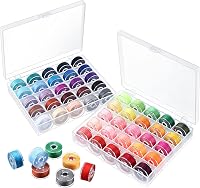
The Outus set contains 50 bobbins and 50 sewing threads in assorted colors. It uses Size A, Grade 15 bobbins and is described as compatible with Brother and Babylock sewing machines.
This set suits you if you sew projects that need different lower-thread colors. The clear plastic box gives each bobbin a separate position, so it is easier to see and retrieve a color without mixing the set.
The bobbins can also be used again after the thread is consumed. That makes the set useful if you prefer winding your own thread later instead of discarding the empty bobbins.
The set's 50 colors are more helpful for matching decorative or visible stitching than for someone who uses one neutral lower thread most of the time. Confirm that the XR9550's manual allows the specific prewound format before loading one.
Simthread 144-piece white prewound bobbins
The Simthread set includes 144 Size A, Class 15, SA156 prewound bobbins in 60-weight white thread. The thread is polyester, and each bobbin has 140 yd of thread.
This option fits a high-volume sewing routine where a large supply of white lower thread is more useful than assorted colors. The pack gives you many prepared bobbins, so you can keep sewing without stopping to wind each one.
Simthread describes the thread as filament polyester and identifies the bobbins as plastic sided. The product is named for use with Brother, Babylock, Janome, Juki, Elna, Quantum Futura and Singer machines, but you should still confirm the XR9550 match in the machine instructions.
White thread may show through on some projects, especially when the fabric is thin or the upper thread is dark. Choose it when the lower thread color suits the fabric and construction method.
EBOOT 144-piece assorted-color bobbins
The EBOOT set includes 144 Size A, Class 15 prewound bobbins in 24 colors. Each color has 6 bobbins, and the thread is 75D/2 filament polyester.
This set suits you if you want a large supply with more color choice than a single-color pack. Six bobbins per color can help when a project uses the same lower thread across several seams.
The bobbins measure 2 x 2 x 1.14 cm, and the thread is described as smooth polyester filament. EBOOT names Brother, Babylock, Janome, Elna and Singer machines among its compatible machines, with several Brother XR models included in its compatibility details.
That model list does not replace the XR9550 manual. Compare the bobbin diameter and case fit, then install one bobbin and check the thread path before filling several bobbins for a project.
How do you choose between Size A and SA156 bobbins?
Treat Size A, Class 15 and SA156 as the key terms to compare, then verify the machine-specific case. A bobbin can match the general size family while still being unsuitable if its height, edge shape or material differs from the machine's requirements.
Choose assorted colors when you sew visible seams, decorative work or many fabric colors. Choose white prewound bobbins when you use white lower thread often and want a larger single-color supply.
Prewound bobbins save winding time, but they do not remove the need for correct insertion. Check the direction shown in the XR9550 manual, pull the thread through the case's guide, and leave the thread path free of lint.
If you wind your own bobbins, use a bobbin that matches the same Class 15 or Size A format. Do not force a bobbin into the case or use a bobbin that sits high, rubs the sides or turns unevenly.
How do you replace a Brother XR9550 bobbin case?
Turn the machine off before removing the needle plate or working near the hook. Remove the needle, presser foot and bobbin if the manual instructs you to do so, then clear lint with a soft brush.
Take a quick photo of the original case before removing it. Note the latch position, the direction of the thread guide and how the case sits in the holder.
Fit the replacement case in the same orientation. It should sit down fully and remain secure when you gently touch the edge.
Do not press hard if it does not seat, because forcing the case can damage the holder or surrounding parts.
Insert a compatible bobbin and pull the thread through its guide. Hold the upper thread, turn the handwheel toward you to bring up the lower thread, then pull both threads under the presser foot and toward the back.
Sew a few lines on scrap fabric at a slow speed. Watch for loops underneath, skipped stitches, thread breaks or a case that moves out of position.
If the lower thread is uneven, read How Your Bobbin Case Controls Thread Tension before changing the tension screw. A tension problem can come from threading, lint, needle choice or upper-thread setup, not only from the case.
What causes Brother XR9550 bobbin case problems?
A damaged case, incorrect seating and lint around the hook are common reasons for lower-thread trouble. The first step is to stop sewing and inspect the area instead of continuing with a case that scrapes or shifts.
Check for these signs:
- The case has a crack, burr or bent edge.
- The bobbin does not turn smoothly.
- The thread catches at the case opening.
- The case rocks in its holder.
- The needle strikes the case.
- The lower thread forms loops after correct threading.
- The machine makes a scraping or clicking sound.
A case that has been struck by the needle should be replaced or checked before you continue. A small mark can catch thread and create repeated breaks.
Clean away lint without using a sharp tool against the case or hook. Replace the needle if it is bent, and rethread both paths with the presser foot raised.
For a broken spring or a case whose tension part has failed, follow How to Replace a Broken Bobbin Case Spring. If the machine still makes unusual noise after the case and bobbin are correctly installed, stop and arrange model-specific service.
How should you care for the bobbin case?
Keep the case clean, dry and protected from loose tools. Store spare cases in a small container so the rim and latch do not rub against scissors, needles or metal parts.
A small dedicated box or pouch works well for most sewing rooms. It keeps dust away and stops a spare case from being knocked or bent in a drawer.
Remove the bobbin after sewing if the machine will sit unused for a long period. This leaves the case empty and makes it easier to see lint or damage before the next project.
Before the next project, check that the case is free of lint and that the bobbin turns without resistance. Hold the case gently and turn the bobbin with a clean fingertip to feel for rough spots.
Clear lint with a soft brush rather than a pin or sharp tool. Sharp tools can scratch the rim or hook area and create a new thread problem.
Do not add oil unless the Brother manual specifically directs you to oil that area. Excess oil can reach thread and fabric, while the wrong lubricant can create a different maintenance problem.
Use the correct bobbin instead of trimming or altering one to force a fit. A damaged edge can affect thread delivery and may also interfere with the hook.
Inspect the case spring and thread guide from time to time as well. A weak spring or bent guide can change thread release even when the case looks clean.
If you sew often, make this check part of your needle change routine. Fresh thread and a clean case together give you a clearer view of any stitch issue.
Label spare cases so you do not mix them with cases for other machines. Similar cases can be easy to confuse after storage.
Which Brother XR9550 bobbin case should you choose?
Choose a model-specific Brother XR9550 case first, then select Class 15 or Size A bobbins that sit correctly in it. The case choice comes before the bobbin choice because the case must seat in the holder correctly.
The Outus set suits color variety, Simthread suits a large supply of white 60-weight thread, and EBOOT suits many colors in a 144-piece pack. Each option answers a different sewing need once the case is confirmed.
If the case is damaged, replace the case rather than trying to correct the problem with a different bobbin. A new bobbin cannot straighten a bent rim or strengthen a weak latch.
If the case looks fine but the stitches are poor, recheck threading, bobbin direction, lint and needle condition before changing tension. These checks are quick and often reveal the cause.
Work through the basics in order and test after each change. Changing several settings at once makes it hard to know what helped.
The closest next step is to compare your machine's part number and case shape with the manual. Note the latch position and thread guide so you can compare a replacement on arrival.
Once the case is confirmed, use the matching Size A or SA156 bobbin format and test the first stitches on scrap fabric. Try a straight seam on a fabric similar to your project and check both sides.
Keep the test piece so you can compare settings if you change thread or fabric later. A clear sample makes future checks faster.
Store the case with its matching bobbins so you do not pair it with a different size by mistake. That simple habit protects the fit you have already checked.
Frequently asked questions
What bobbin case fits the Brother XR9550?
The Brother XR9550 uses a Class 15 bobbin system, also called Size A or SA156. Choose a replacement case made for the XR9550 or the exact Brother case number in your manual, then confirm that the case shape, latch and seating match your machine before sewing.
Does the Brother XR9550 use an SA156 bobbin?
Yes, the Brother XR9550 uses the common Class 15, Size A or SA156 bobbin format. The bobbin itself and the bobbin case are separate parts, so confirm both parts match the machine.
A bobbin that fits the size standard does not automatically prove that every case fits.
Can I use prewound bobbins in the Brother XR9550?
Prewound bobbins can be useful when their size and material match the machine's requirements. The products discussed here use Size A or Class 15 formats, but you should still check the Brother manual and test thread delivery at a slow speed before regular sewing.
How do I know if a bobbin case is installed correctly?
A correctly installed bobbin case sits fully in its holder, follows the machine's orientation marks and lets the bobbin thread pull smoothly. Turn the handwheel toward you several times with the presser foot raised, then check that the needle, bobbin and case move without scraping or catching.