Brother SE2000 Review: Worth It? (November 2026)
The Brother SE2000 is the stronger choice for a home workspace that needs both sewing and embroidery, with a 5 x 7 in embroidery field, 241 sewing stitches and wireless design transfer. Its larger size and 38 lb weight need more dedicated space than the SE700.
On this page (9 sections)
- Is the Brother SE2000 worth considering?
- How does the SE2000 handle sewing and embroidery?
- How does wireless design transfer work?
- Is the SE2000 suitable for a home workspace?
- How does the Brother SE700 compare?
- What thread works well for embroidery planning?
- What should you check before starting an embroidery project?
- What are the main Brother SE2000 trade-offs?
- Brother SE2000 review: who should buy it?
The Brother SE2000 is a strong choice for a home workspace that needs both sewing and embroidery, especially if you want a 5 x 7 in embroidery field and 241 sewing stitches. Its main trade-offs are a 38 lb weight, a larger footprint than the SE700 and US-only 120-volt use.
The SE2000 combines sewing, embroidery, wireless design transfer and touchscreen editing in one machine. We compared its stated features with the lighter Brother SE700 and considered how the differences affect everyday quilting and embroidery work.
Is the Brother SE2000 worth considering?
The Brother SE2000 is worth considering when larger embroidery designs and broad sewing options matter more than low weight. It has a 5 x 7 in embroidery field, 241 sewing stitches, 193 built-in embroidery designs and 50 downloadable designs.
Brother SE2000 Sewing and Embroidery Machine Computerized: Best for larger home embroidery projects

- 5 x 7 in embroidery field
- 241 sewing stitches
- 193 built-in and 50 downloadable embroidery designs
- Wireless LAN and 3.7 in touchscreen
A versatile computerized sewing and embroidery machine for makers who want more embroidery room and a broad stitch selection in one machine.
Pros
- 5 x 7 in embroidery field
- 241 built-in sewing stitches
- Wireless file transfer
- 50 downloadable embroidery designs
Cons
- 38 lb weight needs a sturdy workspace
- Intended for sale only in the US at 120 volts
Its 3.7 in touchscreen supports letter editing, zooming, resizing, rotating, repositioning and combining designs. Advanced Color Sort can adjust the order of color sections, while Jump Stitch Trimming trims excess thread jumps within the color.
The machine also supports wireless design transfer through a PC and Design Database Transfer software. A built-in USB port gives you another way to move embroidery files.
For a broader comparison, see our guide to the Best Embroidery And Quilting Combo Machine For Home Use.
Who should choose the SE2000?
Choose the SE2000 if you want one machine for decorative sewing, lettering and embroidery projects that can use a 5 x 7 in field. The larger field gives you more room than a 4 x 4 in machine for designs that fit within those dimensions.
It also suits users who want many built-in sewing choices. The 241 stitches include 10 styles of 1-step buttonholes, according to the product information.
The SE2000 is less suited to a workspace where the machine must be moved often. Its listed weight is 38 lb, and its dimensions are 17.56 in deep, 9.49 in wide and 11.81 in high.
How does the SE2000 handle sewing and embroidery?
The SE2000 handles both regular sewing and embroidery without requiring two separate machines. Its sewing side has 241 built-in stitches, while its embroidery side has 193 built-in designs, 50 downloadable designs and 13 embroidery fonts.
Use the sewing stitches for piecing, decorative details and buttonholes. Use the embroidery functions for lettering, motifs and combined designs that fit the 5 x 7 in field.
The machine includes 8 sewing feet, including zigzag, monogramming, overcasting, zipper, blind stitch, button fitting, buttonhole and embroidery feet. It also includes a 5 x 7 in embroidery frame set.
Its touchscreen lets you preview and adjust designs before stitching. That can help you check placement and color choices before committing thread and fabric.
The SE2000 also includes My Custom Stitch, which lets you design custom sewing stitches and save them on the machine. This feature is separate from creating embroidery patterns through the Artspira mobile app.
How does wireless design transfer work?
Wireless transfer gives the SE2000 two ways to move embroidery files without relying only on a physical connection. You can send files from a PC through Design Database Transfer software or use the built-in USB port.
The Artspira mobile app provides another design path. It offers 50 free embroidery designs, lets you draw custom patterns on a mobile device and supports wireless transfer of downloaded patterns.
Before starting a project, confirm that the design fits the 5 x 7 in field. Also check the design's color order, thread plan and placement so you can prepare the fabric and thread before stitching.
The wireless functions are useful when your designs are already digital. They don't remove the need to organize files, confirm dimensions or choose suitable thread colors.
Our guide on How to Use Your Quilting Machine for Embroidery covers the general workflow from design choice through stitching.
Is the SE2000 suitable for a home workspace?
The SE2000 suits a dedicated home sewing area with enough room for a 38 lb machine. Its 17.56 in depth and 11.81 in height should be checked against your table, shelves and storage area before setup.
Measure the table surface rather than checking only the room. You need space for the machine, fabric movement, thread handling and access to the touchscreen.
The included accessory set is broad. It includes 4 bobbins, a needle set, scissors, seam ripper, cleaning brush, screwdrivers, spool caps, a knee lifter, an eyelet punch, a twin needle and an accessory bag.
The machine uses metal and plastic and runs on electric power at 120 volts of alternating current. The product information says it is intended for sale only in the US at 120 volts, and other use or sale may void the warranty.
Check your outlet and workspace before buying. A machine that fits the table but leaves no room to handle a quilt block can still make sewing uncomfortable.
How does the Brother SE700 compare?
The Brother SE700 is the better choice for a smaller and lighter workspace, while the SE2000 is better for a larger embroidery field and more sewing stitches. The SE700 weighs 15.6 lb and measures 16.5 in deep, 7.76 in wide and 12.09 in high.
Brother SE700 Sewing and Embroidery Machine: Best for smaller workspaces

- 4 x 4 in embroidery field
- 103 sewing stitches
- 135 built-in embroidery designs
- Wireless LAN and 3.7 in touchscreen
A lighter Brother combination machine for beginners and smaller spaces that do not need the SE2000's 5 x 7 in embroidery field.
Pros
- 15.6 lb weight
- 4 x 4 in embroidery field
- Wireless file transfer
- 8 included sewing feet
Cons
- Smaller embroidery field than the SE2000
- 103 sewing stitches compared with the SE2000's 241
The SE700 has a 4 x 4 in embroidery field, 135 built-in embroidery designs, 10 embroidery lettering fonts and 103 built-in sewing stitches. It also has wireless LAN, Artspira support, a 3.7 in touchscreen and 8 included sewing feet.
Choose the SE700 if most of your embroidery designs fit within 4 x 4 in and you value easier movement. Choose the SE2000 if you want 5 x 7 in embroidery space, 241 sewing stitches, 13 embroidery fonts and 50 downloadable designs.
Our Brother SE700 vs SE2000 comparison lays out the differences by workspace, embroidery size and stitch selection.
The Best Brother Embroidery Machines for Beginners guide may also help if you're choosing your first Brother combination machine.
What thread works well for embroidery planning?
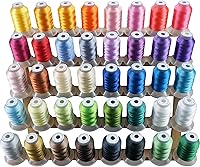
A thread set with many labeled colors can simplify design planning, especially when you want to match colors before starting a project. The Simthread kit has 63 polyester colors, with each spool labeled with a matching Brother color number.
Each spool contains 500 m of 40-weight polyester embroidery thread. The material is 100% polyester, and the kit includes a color chart with Brother color numbers.
The wide color range can help when a design uses several shades. Store the spools so labels remain visible, and match the thread plan to the design before loading the machine.
Thread choice still depends on the project, fabric and design. Our guide to the Best Embroidery Thread For Longarm Machines offers related thread-planning ideas, though the SE2000 is a combination sewing and embroidery machine rather than a longarm machine.
What should you check before starting an embroidery project?
Before stitching, check the design size, hoop area, fabric placement and thread plan. The SE2000's 5 x 7 in field defines the maximum area for a design that can be stitched without changing to a different setup.
Preview the design on the 3.7 in touchscreen and use the editing tools to adjust its position, size, rotation or color plan. If the design needs more space than the field allows, plan where a rehooping step would occur.
Prepare your fabric according to the project instructions. Keep the work area clear so the fabric can move without catching on nearby items.
Organize thread colors before beginning. Advanced Color Sort may reduce color changes for multicolor embroidery designs, but you still need the correct colors available and loaded.
Start with a small practice design when learning the controls. This lets you check placement, thread handling and the chosen fabric before using a larger piece.
What are the main Brother SE2000 trade-offs?
The SE2000's main advantage is the combination of a 5 x 7 in embroidery field and 241 sewing stitches. It also offers wireless transfer, touchscreen editing, built-in designs, downloadable designs and 13 embroidery fonts.
Its main drawback is the physical commitment. At 38 lb, it is much heavier than the 15.6 lb SE700, so it makes more sense on a stable sewing table than as a machine you move after every project.
The 120-volt US-only requirement is another practical limit. Check your electrical setup and intended location before ordering.
The machine also gives you many choices to learn. More designs, fonts and stitch settings can be useful, but they require time to organize and practice.
Brother SE2000 review: who should buy it?
Buy the Brother SE2000 if you want one computerized machine for sewing and embroidery with a 5 x 7 in field. It is the stronger fit for home makers who expect to use larger embroidery layouts, many sewing stitches, wireless transfer and touchscreen editing.
Choose the SE700 if your workspace is smaller, you want a lighter machine or your projects fit within a 4 x 4 in embroidery field. Choose the Simthread kit when you need a broad set of labeled polyester colors to support embroidery planning.
For another embroidery-machine comparison, read our Janome MB7 embroidery machine reviews.
The final decision is simple: pick the SE2000 for more embroidery room and sewing variety, or pick the SE700 for lower weight and a smaller workspace. Check the field size, machine dimensions and 120-volt requirement before you commit to either Brother machine.
Frequently asked questions
Is the Brother SE2000 a good embroidery machine?
The Brother SE2000 suits home makers who want sewing and embroidery in one computerized machine. Its 5 x 7 in embroidery field, 241 sewing stitches, 193 built-in embroidery designs, 50 downloadable designs and wireless file transfer give it more room and options than the SE700.
What size embroidery can the Brother SE2000 make?
The Brother SE2000 has a 5 x 7 in embroidery field and includes a 5 x 7 in embroidery frame set. That larger field can reduce rehooping for designs that fit within the area, but you still need to check each design's dimensions before stitching.
Can the Brother SE2000 sew and embroider?
Yes. The Brother SE2000 combines sewing and embroidery in one machine, with 241 built-in sewing stitches, 193 built-in embroidery designs, 13 embroidery fonts and 50 downloadable embroidery designs.
It also includes 8 sewing feet and an embroidery foot.
Is the Brother SE2000 better than the SE700?
The Brother SE2000 is the better fit when you need a 5 x 7 in embroidery field and 241 sewing stitches. The Brother SE700 is lighter at 15.6 lb and uses a 4 x 4 in field with 103 sewing stitches, so it may suit a smaller workspace or simpler projects.