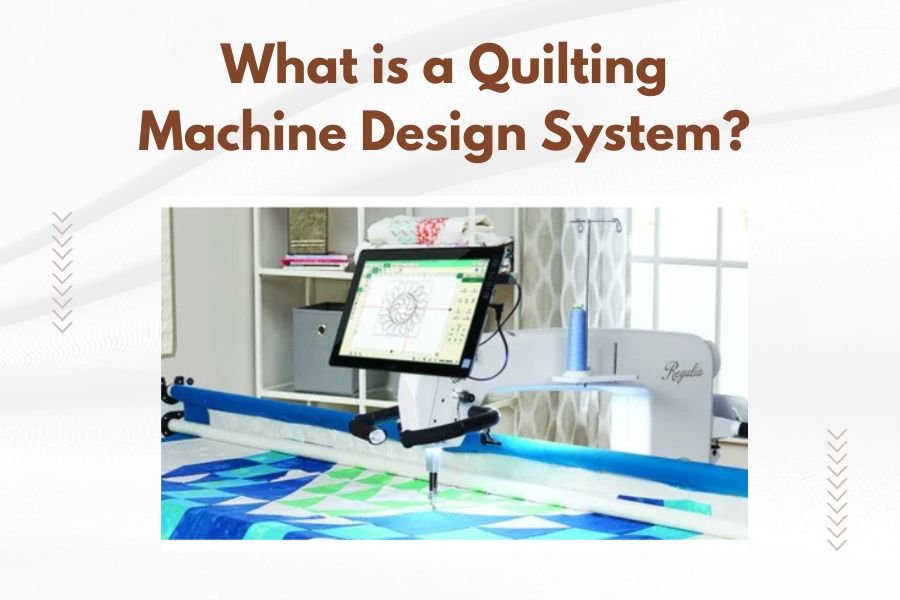
A quilting machine design system is a digital platform that creates, manages, and transfers embroidery and quilting patterns to computerized sewing machines. These systems combine software and hardware to help quilters design custom patterns, edit existing designs, and achieve precise stitching results.
Most quilting machine design systems include pattern creation software, design libraries, file conversion tools, and machine connectivity features that streamline the entire quilting process from concept to finished project.
How Quilting Machine Design Systems Work
Think of a quilting machine design system as the brain behind your computerized quilting machine. It takes your creative ideas and translates them into a language your machine understands.
The system starts with design software on your computer. You can either create new patterns from scratch or import existing designs. The software then converts these visual patterns into stitch data.
Your quilting machine reads this stitch data and follows the precise instructions. It knows exactly where to move the needle, when to change thread tension, and how fast to stitch each section.
Software Components
The software side handles all the creative work. You’ll find tools for drawing shapes, adding text, and combining multiple design elements.
Most systems let you preview your design before stitching. This saves time and prevents costly mistakes on expensive fabric.
Hardware Integration
The hardware component connects your computer to your quilting machine. This might be a USB cable, memory card, or wireless connection.
Some newer systems use cloud storage. You can access your designs from anywhere and sync them across multiple devices.
Types of Design Systems Available
I found that quilting machine design systems fall into three main categories. Each serves different skill levels and budgets.
Basic Consumer Systems
Entry-level systems focus on simplicity. They come with pre-made design libraries and basic editing tools.
You can resize patterns, change colors, and combine simple elements. These work well if you’re just starting with machine quilting.
Popular Features
- Built-in design collections
- One-click resizing
- Simple text adding
- Basic shape tools
- Automatic thread color suggestions
Professional-Grade Systems
Professional systems offer advanced design capabilities. They’re built for quilters who want complete creative control.
These systems handle complex multi-layer designs, precise editing, and commercial-quality output. Many professional quilters rely on these for custom work.
Advanced Capabilities
- Vector-based design tools
- Advanced digitizing features
- Multi-format file support
- Precise stitch editing
- Commercial licensing options
Industrial Solutions
Industrial systems power large-scale quilting operations. They manage multiple machines and handle high-volume production.
These systems include inventory management, production scheduling, and quality control features.
Key Features to Look For
When choosing a quilting machine design system, certain features make a real difference in your quilting experience.
Design Creation Tools
Look for systems with intuitive design tools. You want software that feels natural to use, not something that requires a computer science degree.
The best systems offer both automatic and manual design options. Sometimes you want quick results, other times you need precise control.
Essential Design Features
- Drag-and-drop interface
- Shape libraries
- Text manipulation tools
- Pattern fill options
- Layer management
- Undo/redo functions
File Format Support
Your system should handle multiple file formats. Different machine brands use different formats, and you might want to share designs with other quilters.
I found that the most versatile systems support at least 10-15 different file formats. This gives you flexibility as your quilting setup evolves.
Common Quilting File Formats
| Format | Machine Brand | Usage |
|---|---|---|
| .pes | Brother | Most common home format |
| .dst | Universal | Industrial standard |
| .jef | Janome | Home and commercial |
| .exp | Melco | Professional quilting |
Machine Connectivity
Easy file transfer saves time and reduces frustration. The best systems offer multiple ways to get designs from your computer to your machine.
USB connections work reliably, but wireless options add convenience. Some systems even let you send designs directly from your smartphone.
Benefits of Using Design Systems
Design systems transform how you approach quilting projects. They open up creative possibilities that would be impossible with traditional methods.
Creative Freedom
You’re no longer limited to patterns you can buy or trace by hand. Want a design based on your pet’s photo? A design system can make it happen.
The software handles the complex math of converting images into stitch patterns. You focus on the creative decisions.
Time Efficiency
Once you create a design, you can use it repeatedly. Make variations, resize it for different projects, or combine it with other elements.
I heard from many quilters who say design systems cut their project planning time in half. The computer handles tedious calculations automatically.
Consistency and Precision
Hand-guided quilting varies slightly each time. Design systems deliver identical results every time you stitch a pattern.
This consistency is especially valuable for large projects or when making multiple identical items.
Quality Improvements
- Perfect pattern alignment
- Consistent stitch density
- Accurate sizing
- Smooth curves and lines
- Optimal thread path planning
Choosing the Right System for Your Needs
The perfect design system depends on your current skill level, budget, and quilting goals. Don’t buy more system than you need, but leave room to grow.
Assess Your Current Setup
Start by checking what your quilting machine supports. Some machines work only with specific software brands or file formats.
Consider your computer setup too. Design software can be demanding, especially when working with complex patterns.
Machine Compatibility Questions
- What file formats does your machine accept?
- How do you transfer files to your machine?
- What’s the maximum design size your machine handles?
- Does your machine support multi-color designs?
Budget Considerations
Design systems range from free basic software to professional packages costing thousands of dollars.
I found that most hobbyist quilters get excellent results from mid-range systems. You don’t need industrial features for personal projects.
Cost Breakdown
- Basic systems: Free to $200
- Intermediate systems: $200 to $800
- Professional systems: $800 to $3000
- Industrial solutions: $3000 and up
Learning Curve Factors
Some systems are easier to learn than others. If you’re not comfortable with computer software, prioritize user-friendly interfaces.
Look for systems with good tutorial resources. Video tutorials and active user communities make learning much easier.
Getting Started with Your First Design System
Once you’ve chosen a system, take time to learn it properly. Rushing through the basics leads to frustration later.
Start with Simple Projects
Begin with basic shapes and simple patterns. Master the fundamental tools before attempting complex designs.
Most systems include sample projects designed for beginners. These teach you the workflow while creating useful patterns.
Good First Projects
- Simple geometric borders
- Text-based designs
- Basic floral motifs
- Straight-line quilting patterns
Practice File Management
Organize your designs from day one. Create folders for different project types, themes, or sizes.
Back up your design files regularly. You’ll invest hours creating custom patterns, and losing them is heartbreaking.
Join User Communities
Online forums and social media groups offer valuable support. Experienced users share tips, troubleshoot problems, and often share free designs.
Many software companies maintain active user communities. These are goldmines of practical advice and inspiration.
Common Challenges and Solutions
Every quilter faces similar challenges when starting with design systems. Knowing what to expect helps you prepare.
Software Learning Curve
Design software feels overwhelming at first. You see dozens of tools and options without knowing where to start.
Focus on learning one tool at a time. Master basic shape creation before moving to advanced editing features.
Design Translation Issues
Sometimes designs look perfect on screen but stitch poorly. This usually comes from improper stitch density or path planning.
Most systems include simulation features that preview how designs will actually stitch. Use these religiously, especially when starting out.
Common Stitching Problems
- Thread breaks from excessive density
- Fabric puckering from poor stabilization
- Misaligned elements from improper registration
- Uneven stitching from incorrect tension settings
File Compatibility Headaches
Different systems use different file formats, and conversion doesn’t always work perfectly.
Keep master files in your system’s native format. Only convert to other formats when necessary for machine compatibility.
Conclusion
A quilting machine design system opens up a world of creative possibilities for modern quilters. These digital tools transform how you approach pattern creation, editing, and project planning.
The right system depends on your specific needs, machine compatibility, and budget. Start with your actual requirements rather than getting caught up in advanced features you may never use.
Take time to learn your chosen system properly. The initial investment in learning pays dividends through years of enhanced quilting projects. With practice, what seems complex today becomes second nature tomorrow.
Remember that the system is just a tool to support your creativity. The most sophisticated software can’t replace your artistic vision and quilting skills. Use these systems to bring your unique ideas to life more efficiently and precisely than ever before.
What’s the difference between quilting design software and embroidery software?
Quilting design software focuses on continuous-line patterns and geometric designs suitable for longarm quilting machines. Embroidery software specializes in dense fill patterns, lettering, and decorative motifs. While some overlap exists, quilting software emphasizes speed and coverage over fine detail work.
Can I use my quilting design system with different machine brands?
Most design systems support multiple machine formats through file conversion features. You create designs in the software’s native format, then export to your specific machine’s file type. Some quality loss may occur during conversion, so test converted files on sample fabric first.
Do I need special computer hardware to run quilting design software?
Basic quilting software runs on most modern computers, but complex designs benefit from more RAM and processing power. Plan for at least 8GB RAM and a dedicated graphics card if you’ll work with large designs or photo conversions regularly.
How do I back up my custom quilting designs safely?
Store design files in multiple locations: your computer’s hard drive, an external drive, and cloud storage. Export important designs in multiple file formats to ensure future accessibility. Regular automated backups prevent losing hours of design work.
What should I do if my quilting machine doesn’t recognize design files from my software?
Check that you’re exporting in the correct file format for your machine model. Verify file size limits, as some machines restrict design dimensions or stitch counts. Update your machine’s firmware if available, and consult your machine manual for supported specifications.