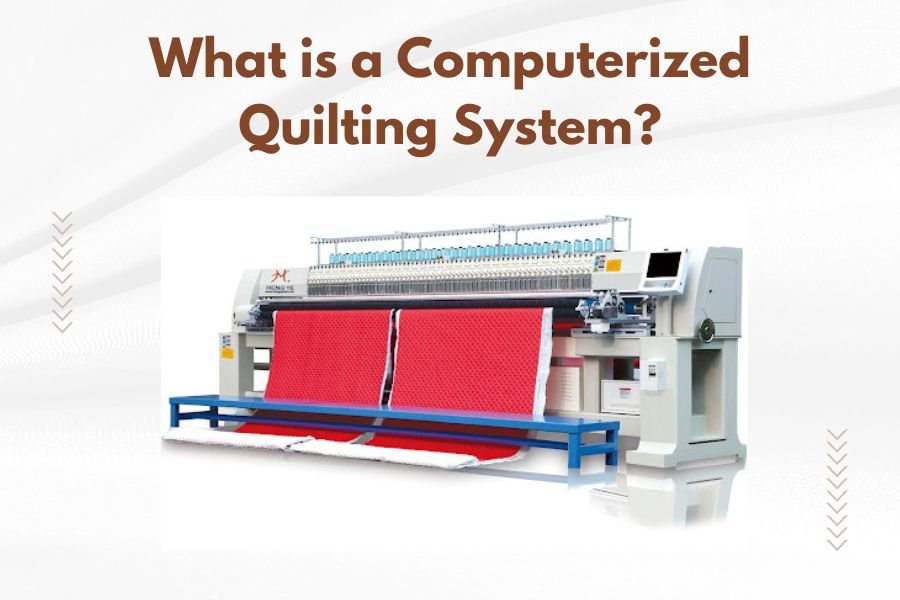
A computerized quilting system is an advanced machine that uses computer technology to automatically stitch quilting patterns onto layered fabric, thread, and batting.
These systems combine precise computer controls with high-speed sewing mechanisms to create consistent, professional quilting results that would take hours to complete by hand.
How Computerized Quilting Systems Work
Think of a computerized quilting system like a robotic artist with a sewing machine. You load your quilt sandwich onto the machine frame. The computer guides the needle head across your fabric following pre-programmed patterns.
The system moves in multiple directions – forward, backward, side to side, and diagonally. This creates the intricate designs you see on finished quilts.
The Basic Components
Every computerized quilting system has four main parts working together:
- Computer control system with touchscreen interface
- Motorized needle head that moves across the fabric
- Large quilting frame to hold your project
- Software library containing hundreds of quilting patterns
Types of Computerized Quilting Systems
You’ll find three main categories when shopping for these machines. Each serves different needs and budgets.
Long-arm Quilting Machines
Long-arm systems offer the most workspace. They typically handle quilts up to king size without any repositioning.
The machine sits on a large frame – usually 10 to 14 feet long. You roll your quilt layers onto the frame like a giant scroll.
Benefits of Long-arm Systems
- Handle large quilts easily
- Professional-quality results
- Fast completion times
- Great for quilting businesses
Mid-arm Quilting Machines
Mid-arm systems work well for medium-sized projects. They’re smaller than long-arm machines but still computerized.
These machines typically handle quilts up to queen size. They take up less room in your sewing space.
Who Should Consider Mid-arm Systems
Mid-arm machines work best if you quilt regularly but don’t need king-size capacity. They cost less than long-arm systems while still offering computer precision.
Desktop Computerized Systems
Desktop systems attach to your existing sewing machine. They add computer control to machines you already own.
These systems work great for smaller quilts and detailed work. You can remove them when you want to use your machine normally.
Key Features to Look For
When researching computerized quilting systems, I found that certain features make a real difference in your quilting experience.
Pattern Library Size
Most systems come loaded with 100 to 1,000 pre-designed patterns. Look for systems that let you add more patterns later.
You want variety in your pattern choices. Edge-to-edge designs, block patterns, and border designs give you flexibility.
Custom Pattern Creation
Advanced systems let you create your own patterns. You can import designs from quilting software or draw patterns directly on the touchscreen.
Stitch Regulation
Good stitch regulation keeps your stitches the same length throughout the quilt. This creates professional-looking results.
The computer adjusts the needle speed based on how fast the machine head moves. Slow movement means slower stitching. Fast movement speeds up the needle.
Manual Override Options
Sometimes you need to take manual control. Look for systems that let you switch between computer and manual modes easily.
Software Capabilities
The software makes your computerized quilting system smart. Better software means better quilting results.
Pattern Editing Tools
You should be able to resize, rotate, and modify patterns. This lets you customize designs for specific quilts.
Some systems let you combine multiple patterns into one design. You might use a floral pattern in the center with a geometric border.
Automatic Functions
Modern systems can automatically calculate thread tension, stitch length, and quilting speed for different fabrics.
Smart Start and Stop
The best systems know where to start and stop quilting. They can tie off threads automatically and move to the next section.
Setting Up Your System
Getting your computerized quilting system ready takes some planning. You need adequate space and proper setup.
Space Requirements
Long-arm systems need a dedicated room or large basement area. Plan for at least 12 feet by 8 feet of floor space.
You also need room to walk around the machine. Loading quilts requires access from multiple angles.
Electrical Needs
Most systems plug into standard household outlets. Check your machine’s power requirements before setup.
Consider dedicated circuits for large systems. This prevents power issues during long quilting sessions.
Loading Your First Quilt
Loading fabric onto computerized systems follows a specific process. Take your time with the first few quilts.
Start with your backing fabric. Stretch it evenly across the frame. Add batting next, then your quilt top.
Tension Adjustment
Proper tension prevents puckering and ensures smooth quilting. The fabric should lie flat but not be stretched tight.
Many quilters describe good tension as “trampoline tight” – firm but with some give when pressed.
Operating Your System
Using a computerized quilting system feels intimidating at first. Start with simple patterns and work up to complex designs.
Choosing Your First Pattern
Pick a simple edge-to-edge pattern for your first computerized quilt. These patterns repeat across the entire quilt surface.
Avoid complex custom designs until you understand how your machine behaves. Simple patterns help you learn the basics.
Monitoring Progress
Stay near your machine during quilting. Computer control doesn’t mean you can walk away completely.
Watch for thread breaks, tension issues, or fabric shifting. Catching problems early saves time and materials.
Thread Management
Keep extra bobbins wound and ready. Long quilting sessions use lots of thread.
Some systems alert you when thread is running low. Others stop automatically when thread breaks.
Maintenance and Care
Computerized quilting systems need regular maintenance to perform well. Clean machines produce better results.
Daily Cleaning Tasks
Remove lint and thread scraps after each quilting session. Pay attention to the needle area and bobbin case.
Wipe down the computer screen with appropriate cleaners. Fabric dust can interfere with touchscreen sensitivity.
Professional Service
Schedule annual professional service for your system. Technicians can spot problems before they cause major issues.
Keep service records for warranty purposes. Some manufacturers require professional maintenance to maintain coverage.
Cost Considerations
Computerized quilting systems represent a major investment. Prices range from a few thousand to over $30,000.
Entry-level Systems
Desktop systems and smaller mid-arm machines start around $3,000 to $8,000. These work well for hobbyists and small studios.
Professional Systems
Full-featured long-arm systems cost $15,000 to $30,000 or more. These machines target quilting businesses and serious enthusiasts.
Financing Options
Many dealers offer financing plans for computerized quilting systems. Some quilters start small businesses to help pay for their machines.
Learning Resources
From what I read online, most quilters need training to use these systems effectively. Manufacturers usually provide some education.
Dealer Training Programs
Good dealers include training with your purchase. This might be a few hours or several days of instruction.
Ask about ongoing support when you buy your system. Some dealers offer monthly user groups or refresher classes.
Online Communities
Quilting forums and social media groups share tips for computerized systems. You can learn from experienced users’ mistakes.
Troubleshooting Common Issues
Even computerized systems have problems sometimes. Knowing how to fix common issues saves time and frustration.
Pattern Alignment Problems
If patterns don’t line up correctly, check your fabric loading. Shifted fabric causes alignment issues.
Recalibrate your system if patterns consistently run off-course. Most machines have calibration routines in their software.
Thread Tension Issues
Inconsistent stitches usually mean tension problems. Check both top thread and bobbin tension settings.
Different thread types may need tension adjustments. Metallic threads often require looser tension than cotton.
Conclusion
Computerized quilting systems open up amazing possibilities for your quilting projects. These machines combine computer precision with traditional quilting techniques to create professional results.
Whether you choose a desktop system or a full long-arm setup, you’ll find that computer control makes complex quilting patterns achievable. The learning curve exists, but the results make the effort worthwhile.
Start by trying different systems at quilt shows or dealer demonstrations. This hands-on experience helps you understand which features matter most for your quilting style. Remember that the best system is the one you’ll actually use regularly.
What’s the difference between a computerized quilting system and a regular sewing machine?
A computerized quilting system moves the needle head automatically across your fabric following programmed patterns, while regular sewing machines require you to manually guide the fabric. Quilting systems also handle much larger projects and have specialized frames to hold quilt layers.
How long does it take to quilt a full-size quilt on a computerized system?
Most computerized systems can complete a queen-size quilt in 2-6 hours depending on the pattern density and machine speed. Complex custom patterns take longer than simple edge-to-edge designs. Hand quilting the same project might take weeks or months.
Can I use any thread type with computerized quilting systems?
Most systems work with cotton, polyester, and rayon threads. Specialty threads like metallic or heavy decorative threads may require tension adjustments and slower speeds. Always test thread compatibility on fabric scraps before starting your actual quilt.
Do I need special software to create custom quilting patterns?
Many systems include basic pattern creation tools, but dedicated quilting software offers more design options. Popular programs let you digitize hand-drawn patterns or create designs from scratch. Some quilters use free online pattern libraries instead of creating their own.
What happens if the power goes out during quilting?
Most modern computerized quilting systems save their progress automatically and can resume where they stopped after power restoration. Some machines have backup power systems or will return to their starting position. Check your manual for specific power failure procedures.