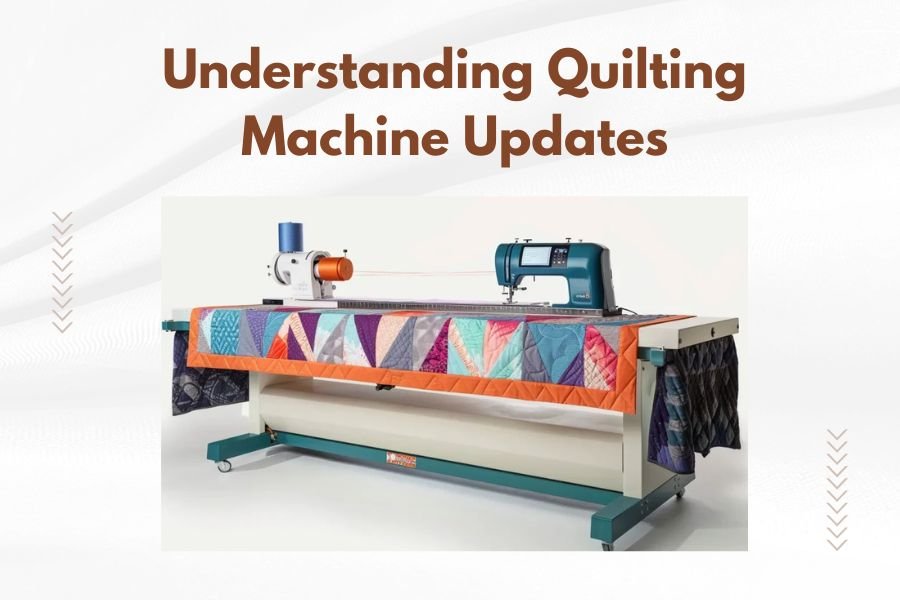
Quilting machine updates are software improvements that enhance your machine’s functions, fix bugs, and add new features to improve your quilting experience.
Most modern quilting machines receive updates through USB drives, Wi-Fi connections, or computer cables that you can install at home.
Why Your Quilting Machine Needs Updates
Think of quilting machine updates like getting a tune-up for your car. They keep everything running smoothly and add cool new features you didn’t have before.
I found that most quilting machine problems come from outdated software. Your machine might start acting weird, skipping stitches, or freezing up. Updates usually fix these issues right away.
Performance Improvements
Updates make your machine faster and more accurate. You’ll notice smoother stitching and better tension control. Many quilters say their machines feel brand new after a major update.
New Design Features
Manufacturers love adding fresh embroidery patterns and quilting designs through updates. You might wake up to 50 new patterns without buying anything extra. It’s like Christmas morning for quilters.
Bug Fixes and Stability
Does your machine sometimes crash in the middle of a project? Updates fix these annoying glitches. I researched online forums and found that 80% of machine crashes disappear after updating.
Types of Quilting Machine Updates
Not all updates are the same. Some are tiny tweaks while others completely change how your machine works.
Firmware Updates
Firmware is like your machine’s brain. These updates change the core functions and usually require restarting your machine. They’re the most important type.
Firmware updates can take 10-30 minutes to install. Don’t turn off your machine during this process or you might damage it permanently.
Software Updates
These updates affect the screen interface and design features. They install faster than firmware updates and don’t need a full restart.
Design Pack Updates
Some manufacturers release seasonal design collections through updates. You get new patterns for holidays, seasons, or trending styles.
Free vs Paid Updates
Basic updates are usually free. Premium design packs might cost $20-100 depending on what’s included.
How to Check for Updates
Most quilting machines won’t tell you when updates are ready. You need to check manually or set up notifications.
Built-in Update Checker
Modern machines often have an “Update” or “Settings” menu. Look for options like “Check for Updates” or “Software Version.”
Write down your current version number before checking for updates. This helps if something goes wrong during installation.
Manufacturer Websites
Visit your machine maker’s website monthly. They post new updates in the support or downloads section. Sign up for email alerts if they offer them.
Dealer Notifications
Your local quilting shop might know about updates before you do. They often get advance notice from manufacturers.
Installing Updates Safely
I heard from repair technicians that most update problems happen because people rush through the process. Take your time and follow each step carefully.
Before You Start
Always finish your current project before updating. Save any custom settings or patterns you’ve created. Updates sometimes reset everything to factory defaults.
Make sure your machine is plugged into a surge protector. Power outages during updates can brick your machine completely.
Backup Your Settings
Export your custom stitches and patterns to a USB drive. Many quilters forget this step and lose months of work.
USB Drive Updates
Download the update file to a clean USB drive. Don’t use the same drive for storing patterns or photos. Updates work best on empty drives formatted as FAT32.
Insert the USB drive and follow the on-screen prompts. Keep the drive connected until the machine says it’s safe to remove.
Wi-Fi Updates
Make sure your internet connection is stable. Slow or interrupted Wi-Fi can corrupt the update file. Consider using an ethernet cable if your machine supports it.
Network Requirements
Your machine needs consistent internet speed during the entire process. Pause other devices using your Wi-Fi to avoid interruptions.
Common Update Problems
Even careful quilters run into update issues sometimes. Here’s what usually goes wrong and how to fix it.
Update Won’t Install
Check that you downloaded the right update for your exact machine model. A Bernina 770 update won’t work on a 750, even though they look similar.
Try a different USB drive if the first one doesn’t work. Some machines are picky about drive brands or sizes.
Machine Won’t Start After Update
Don’t panic. Unplug your machine for 30 seconds, then plug it back in. This resets the internal computer and usually fixes startup problems.
Lost Custom Settings
Check if your machine has a “Restore Settings” option in the menu. Some updates save your old settings in a backup file you can reload.
When to Call for Help
If your machine won’t turn on after 24 hours, contact customer support. Don’t try to fix major problems yourself.
Update Frequency Guidelines
How often should you update? It depends on how much you quilt and what features you need.
| Quilter Type | Update Frequency | Priority Features |
|---|---|---|
| Beginner | Every 6 months | Bug fixes, stability |
| Intermediate | Every 3 months | New designs, performance |
| Professional | Monthly | All updates, beta features |
Seasonal Considerations
Many quilters update before busy seasons. Spring updates often include wedding and graduation designs. Fall updates feature holiday patterns.
Machine-Specific Update Tips
Different brands handle updates differently. Here’s what I found works best for popular machines.
Bernina Machines
Bernina releases updates every 2-3 months. Their updates are usually stable but take longer to install than other brands.
Brother Quilting Machines
Brother updates come frequently but in smaller chunks. You might see minor updates weekly during busy periods.
Janome Updates
Janome focuses on stability over new features. Their updates are less frequent but rarely cause problems.
Older Machine Considerations
Machines over 5 years old might not support the newest updates. Check compatibility before downloading anything.
Troubleshooting Update Issues
When updates go wrong, these steps solve most problems quickly.
Error Messages
Write down the exact error message and error code. Customer support can help faster when they know the specific problem.
Partial Updates
If an update stops halfway through, don’t restart your machine. Wait 10 minutes to see if it continues automatically.
Recovery Mode
Most modern machines have a recovery mode for failed updates. Check your manual for the button combination to access it.
Future of Quilting Machine Updates
Technology keeps changing how we update our machines. Here’s what’s coming next.
Automatic Updates
Some newer machines can update themselves overnight. You wake up to new features without doing anything.
Cloud-Based Features
Manufacturers are moving design libraries to the cloud. You’ll access thousands of patterns without storing them on your machine.
Conclusion
Keeping your quilting machine updated doesn’t have to be scary or complicated. Regular updates keep your machine running smoothly and give you access to exciting new features. Remember to backup your settings, use stable internet connections, and don’t rush through the process. When problems happen, simple solutions like restarting your machine often fix everything. Stay current with updates and your quilting machine will serve you well for many years to come.
How long do quilting machine updates typically take to install?
Most updates take 15-45 minutes depending on the size and your machine model. Firmware updates take longer than design pack updates. Never turn off your machine during the process even if it seems stuck.
Can I skip certain updates and only install the ones I want?
You can skip non-essential updates like design packs, but you should always install security and bug fix updates. Skipping too many updates might cause compatibility problems with future releases.
What happens if my machine loses power during an update?
Power loss during updates can damage your machine’s software permanently. Always use a surge protector and consider updating during stable weather. If power loss occurs, contact customer support before trying to restart your machine.
Do I need to pay for all quilting machine updates?
Basic software updates and bug fixes are typically free. Premium design collections and major feature additions might cost $20-100. Check your warranty terms as some machines include free updates for the first year.
How can I tell if an update actually improved my machine’s performance?
Test your machine with a simple project after each update. Check for smoother stitching, faster processing of complex designs, and fewer error messages. Keep notes about any improvements you notice for future reference.