Stitch regulation problems happen when your quilting machine’s needle speed doesn’t match the fabric movement speed, creating uneven stitches that ruin your project.
You can fix most stitch regulation issues by cleaning the sensors, adjusting your quilting speed, recalibrating the system, or replacing worn encoder wheels.
What Is Stitch Regulation and Why Does It Matter?
Stitch regulation keeps your stitches the same length no matter how fast or slow you move your fabric. Think of it like cruise control for your car. It adjusts automatically to keep things steady.
When stitch regulation works right, you get beautiful, even quilting. When it breaks down, you get tiny stitches in some spots and huge stitches in others. Your quilt looks messy and unprofessional.
How Stitch Regulation Systems Work
Your quilting machine uses sensors to track how fast you’re moving the fabric. These sensors send signals to the motor, telling it when to speed up or slow down the needle.
Most machines use one of two systems: optical sensors that “see” the fabric movement, or encoder wheels that roll along and measure distance. Both work well when they’re clean and properly calibrated.
Common Signs Your Stitch Regulation Isn’t Working
Spotting stitch regulation problems early saves you from ruining entire quilt sections. Here are the warning signs to watch for.
Uneven Stitch Lengths
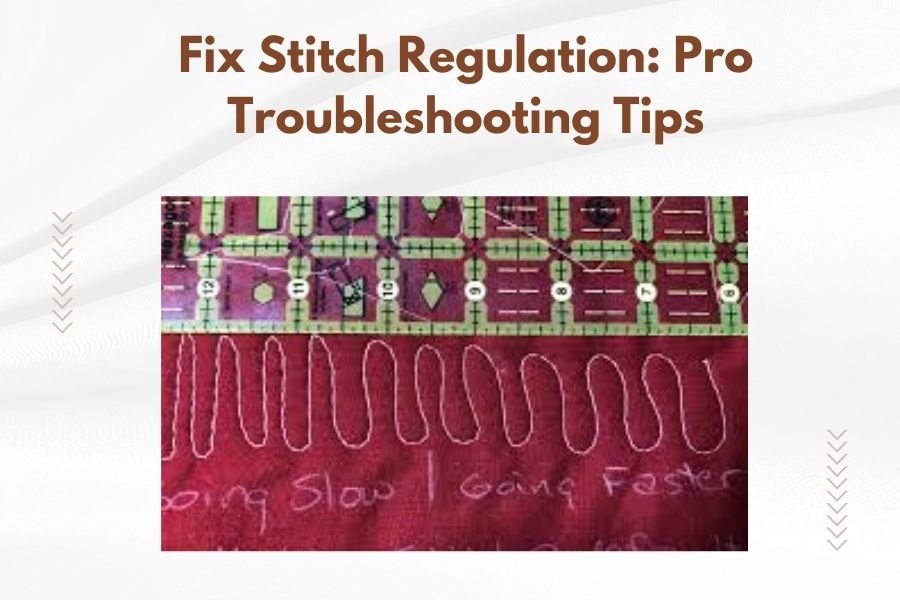
Your stitches look like a roller coaster – some tiny, some huge. This is the classic sign of stitch regulation failure. The machine isn’t matching needle speed to your hand movement anymore.
Machine Runs Too Fast or Too Slow
You move at normal speed, but the machine acts like it’s racing or crawling. The sensors aren’t reading your movement correctly, so the motor gets confused signals.
Stitching Stops Randomly
The needle stops mid-stitch for no reason. This happens when sensors can’t detect any movement, even though you’re still quilting. The machine thinks you’ve stopped.
Thread Breaks and Tension Issues
Bad stitch regulation puts extra stress on your thread. You’ll notice more breaks and tension problems when the system isn’t working right.
Quick Diagnostics: Testing Your Stitch Regulation
Before diving into repairs, run these simple tests to pinpoint the problem area.
The Speed Test
Move your fabric at three different speeds: super slow, medium, and fast. Good stitch regulation should give you similar stitch lengths at all speeds. If stitches get shorter when you move faster, your regulation needs attention.
The Direction Test
Quilt in straight lines going forward, backward, and sideways. Stitch length should stay consistent in all directions. If one direction gives you problems, check for sensor blockages on that side.
The Stop-and-Go Test
Start quilting, stop for two seconds, then start again. The machine should pick up smoothly without extra-long or extra-short stitches at the restart point.
Step-by-Step Troubleshooting Solutions
Now let’s fix those stitch regulation problems. Start with the easiest solutions and work your way down.
Clean Your Sensors First
Dirty sensors cause 80% of stitch regulation problems. Lint, thread bits, and dust block the sensors from reading fabric movement properly.
Turn off your machine and unplug it. Use a soft brush or compressed air to clean around the sensor areas. I found that most machines have sensors near the needle bar or under the machine head.
Don’t use water or cleaning chemicals on sensors. They’re sensitive electronic parts that can break if they get wet.
Check Encoder Wheels
If your machine uses encoder wheels, make sure they’re clean and rolling freely. These little wheels measure fabric movement by rolling along as you quilt.
Wipe the wheels with a dry cloth. Check that they spin easily without wobbling. Replace any wheels that feel rough or sticky when they turn.
Recalibrate Your System
Most quilting machines need regular calibration to keep stitch regulation accurate. Think of it like tuning a guitar – things drift over time and need adjustment.
Check your manual for calibration steps. They’re different for every brand. Usually, you’ll run a test pattern while the machine learns your movement speed.
Adjust Your Quilting Technique
Sometimes the problem isn’t the machine – it’s how you’re using it. Stitch regulation works best with smooth, steady movements.
Keep your hands relaxed and move at a consistent pace. Don’t jerk the fabric or change direction too quickly. The sensors need time to read your movements and adjust.
Advanced Fixes for Stubborn Problems
Still having issues? These deeper solutions tackle more complex stitch regulation problems.
Replace Worn Encoder Components
Encoder wheels and sensors wear out over time, especially on heavily used machines. I researched and found that most quilting experts recommend replacing these parts every 2-3 years of regular use.
Order replacement parts from your machine manufacturer. Generic parts often don’t work as well and can cause more problems.
Update Machine Firmware
Newer firmware versions often include stitch regulation improvements. Check your manufacturer’s website for updates specific to your model.
Download the update to a USB drive and follow the installation instructions carefully. Back up your current settings first in case something goes wrong.
Check Electrical Connections
Loose wires can cause intermittent stitch regulation problems. Turn off and unplug your machine, then check that all sensor cables are firmly connected.
Look for damaged wires or bent connector pins. These need professional repair – don’t try to fix electrical problems yourself.
Prevention Tips to Avoid Future Problems
An ounce of prevention beats a pound of cure. These simple habits keep your stitch regulation working smoothly.
Regular Cleaning Schedule
Clean your sensors every 8-10 hours of quilting time. It takes five minutes but prevents most regulation problems before they start.
Use your machine’s cleaning cycle if it has one. This automated process clears out lint and debris from hard-to-reach spots.
Proper Machine Setup
Make sure your machine sits level and stable. Vibration and tilting can throw off sensor readings and cause regulation problems.
Keep your quilting area well-lit so optical sensors can work properly. Poor lighting confuses sensors that rely on visual tracking.
Quality Thread and Needles
Cheap thread creates more lint that clogs sensors. Good-quality thread runs cleaner and reduces maintenance needs.
Change needles regularly. Dull needles create more friction and debris that can interfere with sensor operation.
When to Call a Professional
Some problems need expert help. Don’t waste time struggling with issues that require special tools or training.
Electrical Problems
If sensors aren’t getting power or sending signals, you need professional repair. Electrical problems can damage your entire machine if handled wrong.
Mechanical Wear
When encoder wheels won’t stay aligned or sensor mounts are loose, internal parts may be worn out. This requires disassembly and precision adjustment.
Warranty Considerations
Opening your machine case might void the warranty. Check your warranty terms before attempting internal repairs.
Conclusion
Stitch regulation problems feel overwhelming, but most have simple solutions. Start with basic cleaning and calibration before moving to complex repairs. Regular maintenance prevents most issues and keeps your quilting smooth and professional.
Remember that good stitch regulation depends on clean sensors, proper calibration, and consistent quilting technique. When you combine all three, your machine will produce beautiful, even stitches that make your quilts shine.
Don’t let stitch regulation problems stop your creative flow. With these troubleshooting tips, you can fix most issues yourself and get back to the fun part – creating amazing quilts.
Why does my stitch regulation work sometimes but not others?
Intermittent problems usually mean your sensors are partially blocked with lint or your encoder wheels are starting to wear out. Clean the sensors thoroughly and check that all wheels roll smoothly without sticking.
Can I quilt without stitch regulation if mine breaks?
Yes, you can turn off stitch regulation and quilt manually, but you’ll need to maintain very consistent hand speed to get even stitches. This works better for experienced quilters who have developed steady movement habits.
How often should I calibrate my stitch regulation system?
Calibrate every 40-50 hours of quilting time, or whenever you notice stitch length becoming uneven. Some quilters calibrate monthly as part of routine maintenance, which helps catch problems early.
What’s the difference between optical and encoder wheel systems?
Optical systems use light sensors to track fabric movement and work well with most fabric types, while encoder wheels physically roll along the fabric surface and provide more precise tracking but require more cleaning maintenance.
Should I upgrade to a newer stitch regulation system?
If your current system requires constant adjustment and cleaning, or if replacement parts are hard to find, upgrading makes sense. Newer systems are generally more reliable and easier to maintain than older designs.