
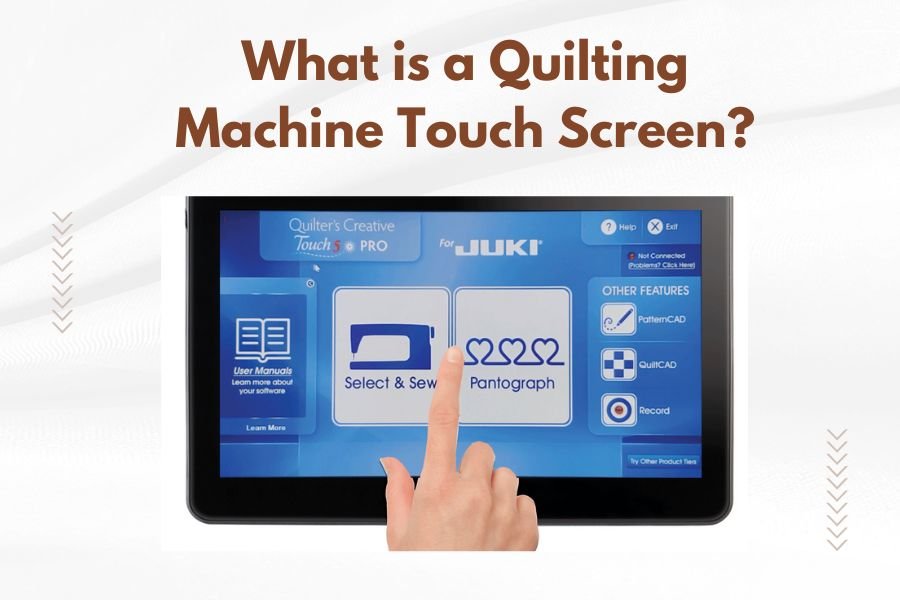
A quilting machine touch screen is a digital control panel that lets you operate modern computerized quilting machines through simple finger taps and gestures. This screen replaces traditional buttons and displays patterns, settings, and machine functions in an easy-to-read format.
Touch screens on quilting machines work like smartphone or tablet displays, showing menus for stitch selection, speed control, pattern editing, and machine monitoring. They make quilting more user-friendly by putting all controls in one convenient location.
How Quilting Machine Touch Screens Work
Think of your quilting machine’s touch screen as the command center for your entire project. When you press an icon or menu option, the screen sends signals to the machine’s computer brain.
The machine then adjusts needle position, fabric movement, thread tension, and stitching speed based on your selections. It’s like having a smart assistant that translates your creative ideas into precise mechanical actions.
Basic Touch Screen Functions
Most quilting machine touch screens handle these main jobs:
- Pattern selection and preview
- Stitch size and spacing adjustments
- Thread tension settings
- Speed control from slow to fast
- Machine status monitoring
Advanced Touch Screen Capabilities
High-end models offer more sophisticated features. You can edit patterns on screen, combine different designs, and save custom settings for future projects.
Some screens even let you import designs from USB drives or connect to your computer. It’s like having a design studio built right into your machine.
Types of Quilting Machine Touch Screens
Not all touch screens are created equal. You’ll find different types depending on your machine’s price range and manufacturer.
Resistive Touch Screens
These older-style screens respond to pressure from your finger or stylus. They’re less sensitive than modern screens but still get the job done.
You might need to press a bit harder to register your touch. They work fine with gloves on, which some quilters prefer during long sewing sessions.
Capacitive Touch Screens
These newer screens use electrical signals from your skin to detect touches. They’re more responsive and support multi-touch gestures like pinching to zoom.
Most premium quilting machines use capacitive screens because they feel more natural and modern. They respond to light touches just like your smartphone.
Color Display Options
Screen quality varies from basic black-and-white displays to full-color HD screens. Color screens make it easier to see pattern details and thread colors.
Some machines show realistic fabric previews so you can see how your quilt will look before you start stitching.
Benefits of Touch Screen Controls
Why do so many quilters love touch screen machines? The advantages go way beyond just looking modern.
Simplified Operation
Remember the days of hunting through printed manuals to find the right button combination? Touch screens put everything at your fingertips with clear visual menus.
You can see all your options on one screen instead of memorizing complex button sequences. It’s like switching from a flip phone to a smartphone.
Visual Pattern Selection
Instead of guessing what “Pattern 47” looks like, you can see actual previews on screen. Many machines show how patterns will look with different thread colors.
This visual approach saves time and reduces mistakes. You’ll know exactly what you’re getting before the first stitch.
Real-Time Adjustments
Want to make your stitches smaller or change the pattern density? Touch screens let you adjust settings and see the changes immediately.
Some machines even show you a preview of how the adjustments will affect your final design.
Error Prevention and Guidance
Smart touch screens can detect potential problems before they happen. They’ll warn you if thread tension is wrong or if you’ve selected incompatible settings.
Many screens also provide step-by-step guidance for complex procedures like threading or bobbin winding.
Common Touch Screen Features
Most modern quilting machines share similar touch screen functions, though the exact layout varies by manufacturer.
Pattern Library Access
Your machine’s built-in patterns appear as thumbnail images on screen. You can scroll through categories like floral, geometric, or traditional designs.
Higher-end machines might include hundreds or even thousands of pre-loaded patterns. Some let you download new patterns from the manufacturer’s website.
Editing and Customization Tools
Basic editing features let you rotate, resize, or mirror patterns. Advanced machines offer more detailed editing options.
You might be able to change individual elements within a pattern or combine multiple designs into one custom layout.
Memory and Storage Functions
Touch screens typically include memory slots for saving your favorite settings or custom patterns. Think of these like bookmarks for your most-used designs.
Some machines connect to USB drives or memory cards for expanded storage options.
Choosing the Right Touch Screen Machine
Shopping for a touch screen quilting machine can feel overwhelming with so many options available. Here’s what to consider.
Screen Size and Resolution
Larger screens are easier to see and use, especially if you spend long hours quilting. Look for screens at least 4-5 inches diagonal.
Higher resolution displays show cleaner text and more detailed pattern previews. If you plan to do detailed editing work, invest in a crisp, clear screen.
Menu Organization and User Interface
The best touch screens organize functions logically with clear icons and text. Avoid machines with cluttered or confusing menu layouts.
If possible, try the machine in person to see how intuitive the interface feels. What seems simple to one person might confuse another.
Response Speed and Accuracy
Touch screens should respond quickly to your inputs without lag or missed touches. Slow or unresponsive screens become frustrating during long projects.
Test the screen’s accuracy by trying different menu options and settings adjustments.
Maintenance and Care Tips
Touch screens need regular care to stay responsive and clear. Good maintenance habits will extend your screen’s life.
Cleaning Your Touch Screen
Use only soft, lint-free cloths to clean your screen. Microfiber cloths work perfectly for removing fingerprints and dust.
Avoid harsh chemicals or abrasive cleaners that might damage the screen surface. A slightly damp cloth usually handles most cleaning needs.
Protecting from Damage
Keep sharp objects away from your screen surface. Even small scratches can affect touch sensitivity over time.
Some quilters apply screen protectors like those used on phones and tablets. This extra layer prevents scratches and makes cleaning easier.
Software Updates and Backups
Many manufacturers release software updates that improve touch screen performance or add new features. Check your manual for update instructions.
Back up any custom patterns or settings you’ve created. Losing personalized work due to technical problems is heartbreaking.
Troubleshooting Common Issues
Even the best touch screens sometimes act up. Here are solutions for the most common problems.
Unresponsive Screen Areas
If parts of your screen stop responding to touches, try cleaning the surface first. Dirt or residue can interfere with touch detection.
Restarting your machine often resolves temporary software glitches that affect screen responsiveness.
Calibration Problems
When your touches register in the wrong spots, your screen might need recalibration. Most machines include a calibration function in their settings menu.
Follow the on-screen prompts to touch specific targets that help the system relearn accurate positioning.
Cost Considerations
Touch screen quilting machines typically cost more than basic mechanical models. But the convenience and features often justify the extra expense.
Entry-Level Touch Screen Options
Basic touch screen machines start around $500-800 and offer essential functions like pattern selection and basic editing.
These machines work well for beginners or quilters who want touch screen convenience without premium features.
Professional-Grade Systems
High-end machines with advanced touch screens can cost $3000-10000 or more. They include extensive pattern libraries, sophisticated editing tools, and commercial-grade construction.
Professional quilters and serious hobbyists often find these features worth the investment for their versatility and time-saving capabilities.
Future of Touch Screen Technology
Touch screen technology in quilting machines continues evolving rapidly. New features appear regularly that make quilting easier and more creative.
Connectivity Improvements
Newer machines increasingly offer WiFi connectivity for downloading patterns or sharing designs online. Some connect directly to cloud storage services.
This connectivity lets you access vast pattern libraries and share your creations with other quilters worldwide.
Artificial Intelligence Integration
Some manufacturers are exploring AI features that can suggest thread colors, detect fabric types, or automatically adjust settings for optimal results.
These smart features could make quilting more accessible to beginners while offering new creative possibilities for experienced quilters.
Conclusion
Quilting machine touch screens have transformed how we approach fabric crafting by making complex machines more accessible and user-friendly. They put powerful creative tools at your fingertips while simplifying the technical aspects of quilting.
Whether you’re a beginner looking for guided assistance or an experienced quilter wanting advanced editing capabilities, touch screen technology offers something valuable. The key is choosing a machine whose screen size, features, and interface match your specific needs and budget.
As this technology continues advancing, we can expect even more intuitive interfaces and creative possibilities. The future of quilting looks bright with these digital tools enhancing our traditional craft.
Can you use a stylus on quilting machine touch screens?
Most modern quilting machine touch screens work with capacitive styluses designed for tablets and smartphones. Avoid using sharp or hard objects that could scratch the screen surface.
Do touch screens make quilting machines more reliable or prone to breaking?
Touch screens themselves are generally reliable when properly maintained. The electronic components are typically well-protected, but they do add complexity compared to purely mechanical machines. Regular cleaning and careful handling help prevent most issues.
Can you still quilt if the touch screen stops working?
This depends on your specific machine model. Some machines have backup manual controls, while others rely entirely on the touch screen interface. Check your machine’s manual or contact the manufacturer about emergency operation modes.
How bright are quilting machine touch screens for use in different lighting?
Most quality machines include adjustable brightness settings to accommodate various room lighting conditions. Screens should be readable in both bright daylight and dimmer evening lighting when properly adjusted.
Do quilting machine touch screens consume a lot of electricity?
Touch screens use minimal additional power compared to the motor and other machine components. The screen typically accounts for less than 5% of total power consumption, so it won’t significantly impact your electricity usage.
