
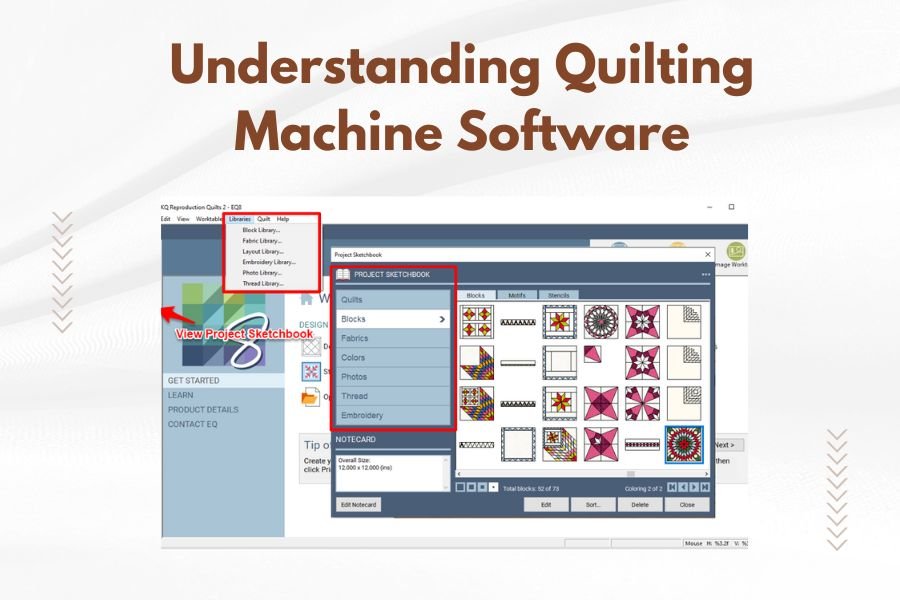
Quilting machine software controls how computerized quilting machines create stitching patterns, manage thread tension, and execute complex designs automatically.
You’ll find three main types of quilting machine software: basic pattern software for simple designs, advanced embroidery software for detailed work, and professional quilting software for commercial operations.
What Is Quilting Machine Software
Think of quilting machine software as the brain that tells your machine exactly what to do. It’s like having a GPS for your needle – it knows where to go, how fast to travel, and when to stop.
The software translates your creative ideas into digital instructions your machine can understand. Without it, your computerized quilting machine would just be an expensive paperweight.
Types of Quilting Machine Software
Not all quilting software is created equal. You’ll encounter different types designed for specific needs and skill levels.
Basic Pattern Software
This entry-level software comes with most home quilting machines. It includes simple geometric patterns, basic lettering, and standard quilting designs.
You can usually resize patterns and adjust spacing. Most basic software handles file formats like .qli, .bqm, or proprietary formats specific to your machine brand.
Professional Embroidery Software
Professional-grade software opens up a world of possibilities. You can create custom designs from scratch, digitize hand-drawn patterns, and edit existing designs with precision.
These programs support multiple file formats including .dst, .exp, .jef, and .pes. They often include automatic digitizing features that convert images into stitchable designs.
Standalone Design Software
Some software works independently of specific machine brands. These programs let you create designs on any computer, then export files compatible with various quilting machines.
This flexibility makes standalone software popular with quilters who own multiple machines or plan to upgrade equipment.
Key Features to Look For
When choosing quilting machine software, certain features make your quilting life much easier. Here’s what matters most.
Design Editing Capabilities
Good software lets you modify existing patterns without starting from scratch. You should be able to resize designs, rotate elements, and combine multiple patterns.
Look for software that includes node editing – this lets you adjust individual points in a design for precise control.
File Format Support
Your software needs to read and write multiple file formats. This keeps you from getting locked into one brand’s ecosystem.
Essential formats include .dst (Tajima), .exp (Melco), .jef (Janome), .pes (Brother), and .vp3 (Pfaff). The more formats supported, the better.
Automatic Features
Smart software includes automatic thread trimming, jump stitch removal, and density adjustment. These features save time and reduce manual work.
Auto-digitizing converts artwork into stitchable designs instantly. While not perfect, it gives you a solid starting point for custom designs.
Popular Quilting Software Options
The market offers several excellent software choices. Each has strengths and weaknesses depending on your needs.
Brother PE-Design
Brother’s software integrates seamlessly with Brother quilting machines. It includes both basic and advanced features, making it suitable for beginners and experts.
The software excels at lettering and monogramming. You’ll find extensive built-in font libraries and easy text manipulation tools.
Janome Digitizer MBX
Janome’s professional software offers powerful digitizing tools and supports numerous file formats. It’s particularly strong for converting photographs into quilting designs.
The learning curve is steeper than basic software, but the results justify the effort for serious quilters.
Hatch Embroidery Software
Wilcom’s Hatch software works with any embroidery machine brand. It offers three versions: Essentials, Personalize, and Create, each with increasing capability levels.
The software includes excellent tutorials and learning resources, making it beginner-friendly despite its professional features.
Understanding File Formats
File formats are like different languages your quilting machine speaks. Using the wrong format is like speaking French to someone who only understands Spanish.
Native Machine Formats
Each machine brand has preferred formats that work best with their equipment. Brother uses .pes, Janome prefers .jef, and Pfaff works with .vp3.
Using native formats usually gives you the best results because they’re optimized for specific machine capabilities.
Universal Formats
Some formats work across multiple machine brands. .dst files are widely supported, making them useful for sharing designs between different machines.
.exp files also work with many machines, though you might lose some formatting details in translation.
Software Installation and Setup
Getting your software running smoothly requires attention to a few technical details. Don’t worry – it’s not rocket science.
System Requirements
Check your computer’s specifications before purchasing software. Most quilting software runs on Windows, though Mac versions are increasingly available.
You’ll typically need at least 4GB RAM, though 8GB or more works better for complex designs. Storage space varies, but plan for at least 2GB free space.
USB Connection Setup
Most quilting machines connect to computers via USB cables. Install your software first, then connect your machine while both are powered on.
Windows usually installs drivers automatically, but keep your machine’s driver CD handy just in case.
Learning to Use Your Software
Even the best software is useless if you can’t operate it effectively. Here’s how to get up to speed quickly.
Start with Built-in Tutorials
Most software includes step-by-step tutorials covering basic operations. Work through these systematically rather than jumping around randomly.
Practice with simple projects first. Create basic shapes, add text, and experiment with colors before attempting complex designs.
Online Resources and Communities
YouTube contains thousands of quilting software tutorials covering everything from basic operations to advanced techniques. Search for your specific software brand for targeted help.
Online quilting forums are goldmines for troubleshooting tips and design inspiration. Other users often share solutions to problems you haven’t even encountered yet.
Common Software Problems and Solutions
Every quilter encounters software hiccups occasionally. Here are the most common issues and their fixes.
File Won’t Open
This usually means format incompatibility. Check that your software supports the file type you’re trying to open.
Try converting the file to a different format using online conversion tools, or ask the design source for an alternative format.
Design Looks Different on Machine
Screen display and actual stitching sometimes differ. This happens when software and machine interpret the same data differently.
Test stitch a small section first to check appearance before committing to a full project.
Thread Color Mismatches
Software colors are approximations of actual thread colors. Your screen shows RGB colors, but thread reflects light differently.
Create a color chart matching your thread collection to software colors for more accurate results.
Advanced Software Features
Once you master basic operations, advanced features open up creative possibilities you never imagined.
Custom Digitizing
Digitizing converts artwork into stitchable designs manually. You place each stitch type and direction deliberately for optimal results.
This process requires practice and understanding of how different fabrics behave under stitching. Start with simple shapes before attempting detailed artwork.
Cross Stitch Mode
Some software includes cross stitch conversion features. These transform regular embroidery designs into cross stitch patterns for quilting.
Cross stitch quilting creates unique texture effects impossible to achieve with traditional piecing methods.
Maintaining Your Software
Like any computer program, quilting software needs occasional maintenance to run smoothly.
Regular Updates
Software companies release updates fixing bugs and adding new features. Check for updates monthly, or enable automatic updating if available.
Updates sometimes add support for new file formats or improve compatibility with newer operating systems.
Backing Up Your Designs
Nothing hurts worse than losing hundreds of custom designs to a computer crash. Back up your design library regularly to external drives or cloud storage.
Organize designs in logical folders by project, theme, or date created. Future you will thank present you for this organization.
Cost Considerations
Quilting software prices range from free basic programs to professional suites costing thousands of dollars.
Budget-Friendly Options
Several free programs offer basic design editing and file conversion. These work well for beginners learning software fundamentals.
Entry-level commercial software typically costs $100-500 and includes more features than free alternatives.
Professional Investment
High-end software costs $1000-3000 but provides commercial-grade capabilities. Consider this investment only if you plan serious design work or business use.
Some companies offer subscription models spreading costs over time rather than large upfront payments.
Troubleshooting Connection Issues
Computer-to-machine communication problems frustrate quilters regularly. Most issues have simple solutions.
USB Port Problems
Try different USB ports if your computer doesn’t recognize your machine. Some ports provide more stable connections than others.
USB hubs sometimes cause connection issues. Connect directly to your computer’s built-in ports when possible.
Driver Issues
Outdated or corrupted drivers prevent proper machine communication. Download fresh drivers from your machine manufacturer’s website.
Uninstall old drivers completely before installing new ones to avoid conflicts.
Choosing Software for Your Skill Level
Matching software complexity to your current abilities prevents frustration and speeds learning.
Beginner Recommendations
Start with software included with your machine, or choose programs specifically labeled “beginner-friendly.” These offer essential features without overwhelming complexity.
Look for software with extensive help files, video tutorials, and active user communities for support.
Intermediate and Advanced Options
Once comfortable with basics, upgrade to software offering custom digitizing, advanced editing, and professional features.
Consider your long-term goals when choosing. Buying software you can grow into saves money over purchasing multiple upgrades.
| Software Level | Key Features | Price Range | Best For |
|---|---|---|---|
| Basic | Pre-made patterns, simple editing | $0-200 | New quilters |
| Intermediate | Design creation, multiple formats | $200-800 | Hobbyist quilters |
| Professional | Full digitizing, commercial features | $800-3000 | Business use |
Conclusion
Understanding quilting machine software transforms your crafting from basic pattern following to unlimited creative expression. The right software acts as your digital quilting partner, handling technical details while you focus on bringing beautiful designs to life.
Start with software matching your current skill level, then grow your capabilities as your confidence builds. Remember that even professional quilters began with simple patterns and basic editing features.
Your quilting journey becomes more enjoyable when technology works with you rather than against you. Take time to learn your software properly – the investment in knowledge pays dividends in every future project you create.
What’s the difference between quilting software and embroidery software?
Quilting software focuses on continuous-line designs and pantographs for long-arm machines, while embroidery software creates filled shapes and decorative stitches for smaller areas. Many programs now combine both capabilities.
Can I use free quilting software for commercial projects?
Most free software includes licensing restrictions prohibiting commercial use. Read license agreements carefully, and invest in commercial-licensed software if you plan to sell your quilted items or services.
How do I convert designs between different file formats?
Use your quilting software’s export function to save designs in different formats, or use online conversion tools for formats your software doesn’t support. Some quality loss may occur during conversion.
Why does my design look different when stitched than on screen?
Screen colors are approximations, and fabric texture affects appearance differently than smooth computer displays. Thread tension, fabric choice, and stabilizer selection all influence final results compared to screen previews.
Do I need internet connection to use quilting software?
Most quilting software runs offline after installation, but some cloud-based programs require internet access. Check software requirements before purchasing if reliable internet isn’t available in your quilting space.
