
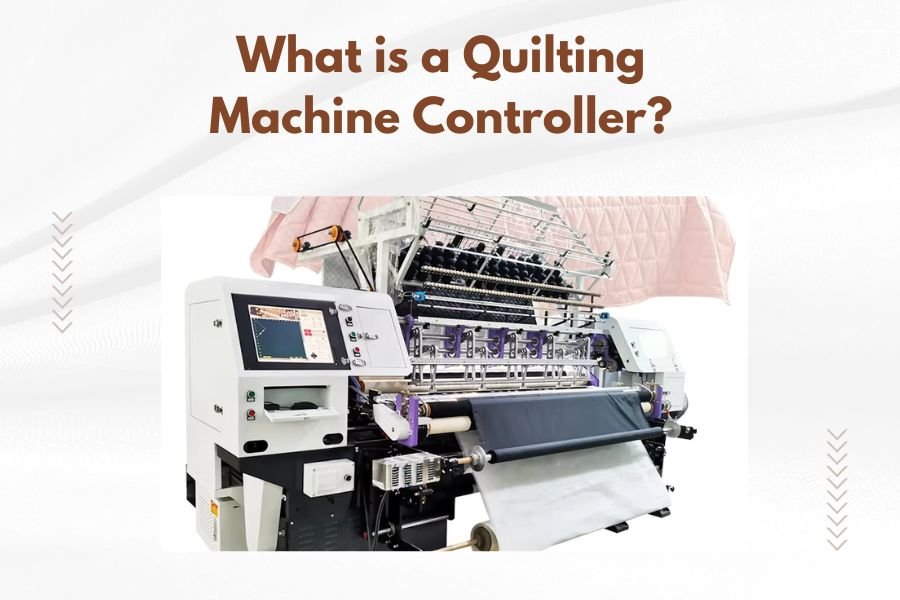
A quilting machine controller is an electronic device that manages the movement and operation of computerized quilting machines, allowing you to create precise stitching patterns automatically.
This controller acts as the brain of your quilting machine, translating digital designs into exact needle movements and fabric positioning for consistent, professional results.
How Quilting Machine Controllers Work
Think of a quilting machine controller like a GPS for your sewing machine. Just as GPS guides your car along the best route, the controller guides your needle along the perfect stitching path.
The controller receives digital patterns from software or built-in designs. It then converts these patterns into precise motor commands. Your machine’s motors move the needle and fabric according to these instructions.
The Basic Control Process
Your quilting process follows these simple steps. First, you load your design into the controller. Next, the controller calculates the exact movements needed. Then it sends signals to the machine’s motors. Finally, the motors move your fabric and needle to create the pattern.
Digital Pattern Translation
Controllers read various file formats like PLT, DXF, and CQP files. Each format contains coordinates and stitch information. Your controller translates these coordinates into real-world measurements on your quilt.
Types of Quilting Machine Controllers
You’ll find three main types of controllers in today’s market. Each offers different features and capabilities for your quilting needs.
Touch Screen Controllers
Touch screen controllers give you the most user-friendly experience. You can see your design preview before stitching starts. These controllers often include editing tools and pattern libraries.
Many quilters prefer touch screens because they’re intuitive. You can zoom in on details, adjust spacing, and modify patterns with simple finger taps.
Button-Based Controllers
Traditional button controllers use physical buttons and small displays. While less fancy than touch screens, they’re often more reliable. Many experienced quilters appreciate their straightforward operation.
Button controllers typically cost less than touch screen versions. They’re also easier to repair when problems occur.
Computer-Connected Controllers
Some controllers connect directly to your computer or tablet. You design patterns on your computer, then send them to the controller. This setup gives you access to powerful design software.
Computer connectivity opens up endless design possibilities. You can download patterns from online communities or create custom designs using specialized software.
Key Features to Look For
When choosing a controller, certain features make your quilting experience much better. Here’s what matters most for your success.
Pattern Storage Capacity
Look for controllers that store plenty of patterns. You don’t want to delete old favorites to make room for new designs. Modern controllers should hold at least 100 patterns.
Speed Control Options
Good controllers let you adjust stitching speed easily. Slow speeds work best for detailed areas. Faster speeds help you finish large background areas quickly.
Variable speed control gives you flexibility. You can slow down for tight curves and speed up for straight lines.
Pattern Editing Capabilities
Basic editing tools save you time and effort. Look for controllers that let you resize, rotate, and mirror patterns. These simple changes create variety without buying new designs.
Resize Functions
Resizing patterns helps them fit your quilt perfectly. You might want a large rose for a center medallion or tiny flowers for borders.
Rotation and Mirroring
Rotating patterns creates interesting layouts. Mirroring helps you create symmetrical designs across your quilt.
Installation and Setup Process
Setting up your controller doesn’t require advanced technical skills. Most manufacturers provide clear instructions and support.
Physical Installation
Controllers typically mount near your machine’s head. You’ll connect cables to your motors and encoder systems. Follow your manufacturer’s wiring diagrams carefully.
Many controllers use plug-and-play connections. This makes installation much simpler than older systems that required custom wiring.
Software Configuration
After physical installation, you’ll configure software settings. This includes setting your machine dimensions and calibrating movement distances.
Calibration ensures accurate stitching. You’ll typically stitch test patterns and measure results. Then you adjust settings until measurements match your expectations.
Common Controller Problems and Solutions
Even reliable controllers occasionally have issues. Knowing common problems helps you troubleshoot quickly.
Pattern Distortion Issues
When patterns don’t stitch correctly, calibration problems are usually the cause. Your controller might need recalibration if circles look oval or squares appear rectangular.
Temperature changes can affect calibration. Metal rails expand and contract, changing your machine’s geometry slightly.
Connection Problems
Loose cables cause intermittent operation problems. Check all connections regularly. Vibration from quilting can loosen connections over time.
Keep spare cables on hand. Cable problems often happen at the worst possible moments during big projects.
File Loading Errors
Controllers sometimes can’t read certain file formats. Make sure your patterns use compatible formats. Converting files through quilting software usually fixes format problems.
Maintenance Tips for Long Controller Life
Proper maintenance keeps your controller working smoothly for years. Simple care prevents expensive repairs.
Regular Cleaning
Dust and lint affect electronic components. Clean your controller monthly with compressed air. Pay special attention to cooling vents and connection ports.
Never use water or cleaning solvents on electronic components. Compressed air safely removes debris without moisture damage.
Software Updates
Manufacturers regularly release software updates. These updates fix bugs and add new features. Check for updates every few months.
Updates often improve pattern compatibility too. Newer file formats work better with updated software.
Cost Considerations
Controller prices vary widely based on features and capabilities. Understanding price ranges helps you budget appropriately.
Budget Controllers
Basic controllers start around $500 to $800. These work well for simple patterns and occasional quilting. They typically include essential features without advanced editing tools.
Mid-Range Options
Mid-range controllers cost $800 to $1,500. They offer touch screens, pattern editing, and larger storage capacity. Most serious quilters find these controllers meet their needs perfectly.
Professional Controllers
High-end controllers can cost $1,500 to $3,000 or more. They include advanced features like multi-needle control and complex editing capabilities. Professional quilters often choose these for business use.
Choosing the Right Controller for Your Needs
Your quilting goals determine which controller works best. Consider your current skills and future plans.
Beginner Considerations
If you’re new to machine quilting, start with a simpler controller. Focus on reliability and ease of use over advanced features. You can always upgrade later as your skills develop.
Advanced Quilter Requirements
Experienced quilters benefit from advanced editing tools and large pattern libraries. Consider controllers that grow with your skills and creative ambitions.
Business Use Factors
Commercial quilting requires reliable, fast controllers. Look for models with proven track records in professional settings. Downtime costs money in business operations.
| Controller Type | Best For | Price Range | Key Benefits |
|---|---|---|---|
| Basic Button | Beginners | $500-800 | Simple, reliable, affordable |
| Touch Screen | Hobbyists | $800-1,500 | User-friendly, good features |
| Professional | Business | $1,500+ | Advanced features, speed |
Conclusion
A quilting machine controller transforms your machine from a simple sewing device into a precise pattern-creation tool. The right controller makes complex designs achievable and repeatable, saving you time while improving your results.
Start with your budget and quilting goals when choosing a controller. Basic models work perfectly for learning and simple projects. Advanced controllers offer more creative possibilities as your skills grow. Remember that a reliable mid-range controller often serves you better than a feature-packed model that’s difficult to use.
Take time to learn your controller’s features gradually. Master basic operations first, then explore advanced capabilities. With practice, your controller becomes an extension of your creative vision, helping you create beautiful quilts with professional precision.
What’s the difference between a quilting machine controller and quilting software?
A controller is the hardware that physically operates your machine, while software is the program you use to create and edit designs. The controller reads files from the software and converts them into machine movements. You need both components for computerized quilting.
Can I upgrade my existing quilting machine with a new controller?
Many quilting machines can accept controller upgrades, but compatibility varies by manufacturer. Check with your machine maker or a qualified technician before purchasing. Some older machines may need additional hardware modifications to work with modern controllers.
How long do quilting machine controllers typically last?
Well-maintained controllers often last 10-15 years or more. Electronic components are generally reliable, and most failures involve cables or connections rather than the controller itself. Regular cleaning and proper handling extend controller life significantly.
Do all quilting controllers work with the same pattern files?
Controllers support different file formats, though many common formats work across multiple brands. Popular formats include PLT, DXF, and CQP files. Check your controller’s specifications for supported formats, and use conversion software when needed for compatibility.
What should I do if my controller stops responding during quilting?
First, check all cable connections and ensure they’re secure. Try restarting the controller by turning it off and on again. If problems persist, consult your user manual for specific troubleshooting steps or contact technical support for assistance.
