
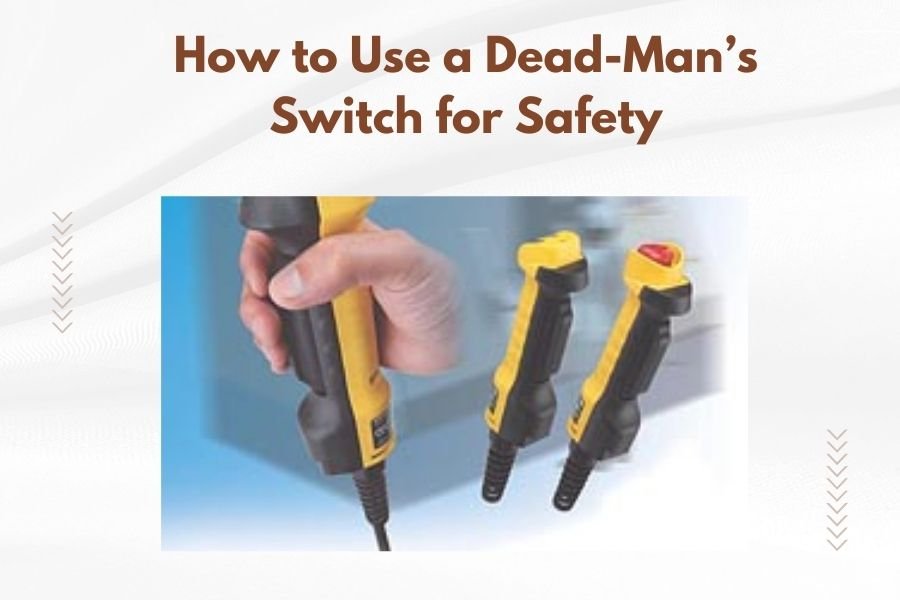
A dead-man’s switch on a quilting machine automatically stops the machine when you release pressure from a foot pedal or hand control, preventing accidents if you lose control.
Using a dead-man’s switch for safety requires keeping constant pressure on the control while operating your quilting machine and releasing it immediately when you need to stop.
What Is a Dead-Man’s Switch on Quilting Machines
Think of a dead-man’s switch like the gas pedal in your car. When you lift your foot, the car stops accelerating. Your quilting machine works the same way with this safety feature.
The switch connects to either a foot pedal or hand controller. As long as you press down, your machine runs. The moment you let go, everything stops instantly.
Many experts say this simple mechanism prevents most quilting accidents (Occupational Safety and Health Administration). It gives you complete control over when your machine starts and stops.
How the Switch Works Mechanically
The dead-man’s switch sits between your power source and the machine motor. When you press the control, it completes an electrical circuit. Release the pressure, and the circuit breaks.
Most modern longarm quilting machines come with this feature built in. Older machines can often have one added as an upgrade.
Types of Dead-Man’s Switch Controls
You’ll find three main types of controls for your dead-man’s switch. Each works a bit differently but serves the same safety purpose.
Foot Pedal Controls
Foot pedals are the most common type. You press with your foot to start the machine and release to stop. They usually sit on the floor near your dominant foot.
I found that many quilters prefer foot controls because they keep both hands free for guiding fabric. Your foot naturally rests on the pedal while you work.
Variable Speed Foot Pedals
Some foot pedals let you control speed by how hard you press. Light pressure runs the machine slowly. More pressure increases the speed.
This gives you better control over tight curves and detailed work. You can slow down for tricky spots without stopping completely.
Hand Controller Switches
Hand controllers look like small boxes with buttons or triggers. You hold them while quilting and squeeze to run the machine.
These work well if you have foot problems or prefer hand control. Some quilters find them more precise for detailed work.
Thumb Switch Controls
Thumb switches attach to the quilting machine handles. You press with your thumb while moving the machine around your quilt.
Research shows these reduce fatigue during long quilting sessions (American Quilter’s Society). Your hands stay in a natural position while you work.
Setting Up Your Dead-Man’s Switch Properly
Getting your switch set up right makes quilting safer and more comfortable. Poor placement can cause accidents or strain your body.
Foot Pedal Placement
Place your foot pedal where your foot naturally rests. You shouldn’t have to reach or stretch to use it.
Keep the pedal on a non-slip mat so it won’t slide around. I found online that many quilters use rubber car mats under their pedals.
Height Considerations
Your foot should rest comfortably on the pedal without lifting your heel. If the pedal is too high, your leg will get tired quickly.
Some pedals have adjustable legs or rubber feet. Use these to get the right angle for your comfort.
Hand Controller Setup
Hand controllers should feel natural in your grip. The switch button should be easy to reach with your finger or thumb.
Make sure the cord is long enough that you don’t feel pulled or restricted. Coil extra cord length neatly to avoid tangles.
Safe Operating Techniques
Using your dead-man’s switch correctly takes some practice. These techniques will help you quilt safely from day one.
Starting Your Machine
Always check that your needle is in the up position before starting. This prevents thread breaks and fabric pulls.
Apply gentle pressure to your switch control. Most machines start slowly and build up to your set speed.
Smooth Acceleration
Don’t jam the switch down all at once. Gradual pressure gives you better control and smoother stitching.
Think of it like driving. You don’t floor the gas pedal when leaving a parking space. The same gentle approach works for quilting.
Emergency Stopping
The biggest advantage of a dead-man’s switch is instant stopping power. When something goes wrong, just let go.
Practice emergency stops during your first few quilting sessions. You want this response to become automatic.
| Emergency Situation | Response | Next Step |
|---|---|---|
| Thread breaks | Release switch immediately | Rethread and continue |
| Fabric bunches up | Let go of control | Smooth fabric before restarting |
| Needle breaks | Stop instantly | Replace needle, check for damage |
| Hand gets too close to needle | Release switch fast | Reposition hands safely |
Common Mistakes to Avoid
Even experienced quilters make mistakes with dead-man’s switches. Learning what not to do keeps you safer.
Keeping the Switch Engaged Too Long
Don’t hold down your switch when you’re not actively quilting. This leads to accidental stitching and wasted thread.
Get in the habit of releasing the control every time you pause. Even a two-second break deserves a switch release.
Poor Body Position
Reaching for your foot pedal or straining to hold a hand controller causes fatigue. Tired quilters make more mistakes.
I came across advice from ergonomics experts who say your control should feel natural and comfortable. If it doesn’t, adjust your setup.
Foot Pedal Problems
Don’t use the side of your foot on the pedal. This reduces your control and can cause cramping.
Keep your whole foot on the pedal surface. Your ankle should move naturally up and down.
Maintenance and Troubleshooting
Dead-man’s switches need regular care to work properly. A faulty switch puts your safety at risk.
Cleaning Your Controls
Dust and lint can interfere with switch operation. Clean your controls monthly with compressed air.
For foot pedals, wipe the outside with a damp cloth. Don’t let moisture get inside the electrical parts.
Testing Switch Response
Test your dead-man’s switch before each quilting session. Press and release it a few times to make sure it responds quickly.
The machine should start and stop instantly. Any delay or hesitation means you need repairs.
Signs of Switch Problems
Watch for these warning signs that your switch needs attention:
- Machine doesn’t start when you press the control
- Delay between pressing and machine starting
- Machine keeps running after you release the switch
- Intermittent operation that comes and goes
- Control feels sticky or hard to press
Advanced Safety Tips
Once you master basic dead-man’s switch use, these advanced tips make your quilting even safer.
Using Multiple Safety Systems
Some quilters combine dead-man’s switches with other safety features. Emergency stop buttons provide backup protection.
Light curtains around the needle area can also stop the machine if you get too close. Multiple safety systems work better than just one.
Teaching Others Safe Operation
If you teach quilting or let others use your machine, dead-man’s switch training is essential. Don’t assume they know how to use it.
From what I read in safety guidelines, most quilting accidents happen with inexperienced operators (Consumer Product Safety Commission). Take time to explain proper technique.
Practice Sessions
Have new users practice starting and stopping without any fabric in the machine. This builds muscle memory for the controls.
Let them get comfortable with switch pressure and timing before they start quilting real projects.
Conclusion
A dead-man’s switch gives you instant control over your quilting machine and prevents most accidents. Setting it up properly and using correct techniques keeps you safe while you create beautiful quilts.
Remember that safety features only work when you use them correctly. Practice with your dead-man’s switch until operating it becomes second nature. Your fingers, fabric, and finished quilts will thank you for taking safety seriously.
The small effort to master this safety feature pays off with years of safe, enjoyable quilting. Keep your switch well-maintained and trust it to protect you during every quilting session.
How sensitive should my dead-man’s switch be?
Your switch should respond to light pressure but not be so sensitive that it activates accidentally. Most quilters prefer a switch that requires about the same pressure as typing on a computer keyboard.
Can I disable my dead-man’s switch for long quilting runs?
Never disable your dead-man’s switch, even for long projects. The safety benefit outweighs any convenience. If your hand or foot gets tired, take breaks instead of removing the safety feature.
What happens if my dead-man’s switch fails while quilting?
If your switch fails, stop quilting immediately and disconnect power to your machine. Don’t try to work around a faulty safety device. Have the switch repaired or replaced before using your machine again.
Do all quilting machines come with dead-man’s switches?
Most modern longarm and computerized quilting machines include dead-man’s switches as standard equipment. Older domestic machines and some budget models may not have this feature, but you can often add one as an aftermarket upgrade.
How often should I replace my dead-man’s switch?
Replace your dead-man’s switch when it shows signs of wear, stops responding quickly, or feels unreliable. With normal use, a quality switch should last several years, but heavy commercial use may require more frequent replacement.
